Solving the Medical Mess:
A Medical Index Feature From Discovery to Delivery

MerusCase is a case management system for attorneys in the SaaS B2B tech space.

The Users
Paralegals and legal assistants

My Role
Performed all UI/UX design from discovery to delivery including surveys, user interviews, user testing, prototyping, UI design, final designs

User Story
As a legal assistant, I want to keep track of all medical records for a case and keep them updated as new documents come in. The medical index will be sent to clinics and government agencies.
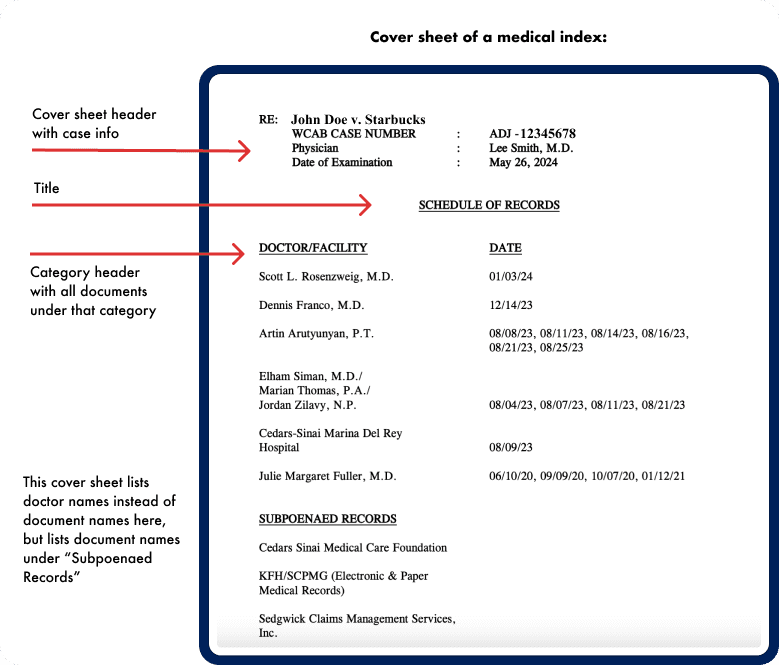
What is a Medical Index?
List of all medical documents involved in a client's case
First page is a cover sheet, giving a full list of all documents inside the index, in order
All medical documents are compiled into one PDF, which is the "official" medical index
Product-Market Fit
At the time, no known competitors offered a medical index tailored to the needs of workers’ compensation law firms. This presented a clear market opportunity.
To gather detailed requirements, I created a survey using Maze and conducted user interviews via Zoom.
Business Challenges

#1 Deal Blocker
The sales team identified the lack of a medical index as the top reason worker’s compensation firms declined to sign.

8% Churn Rate
Several firms cited the missing feature as a factor in their decision to churn.
User Challenges

1-2 Hours
Average time spent by law firm staff to create 1 medical index

Errors
Error-prone process involving many steps and multiple software tools

High Learning Curve
Educating new staff on the process was difficult and time consuming

Discovery Process
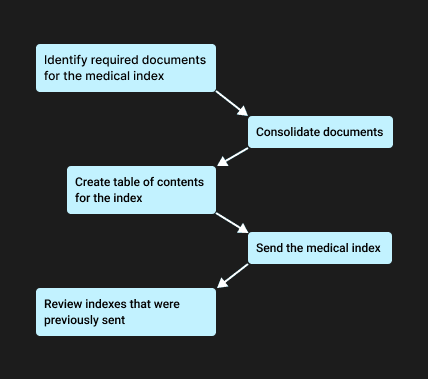
Uncovering Problems - How do Users Create Medical Indexes Now?
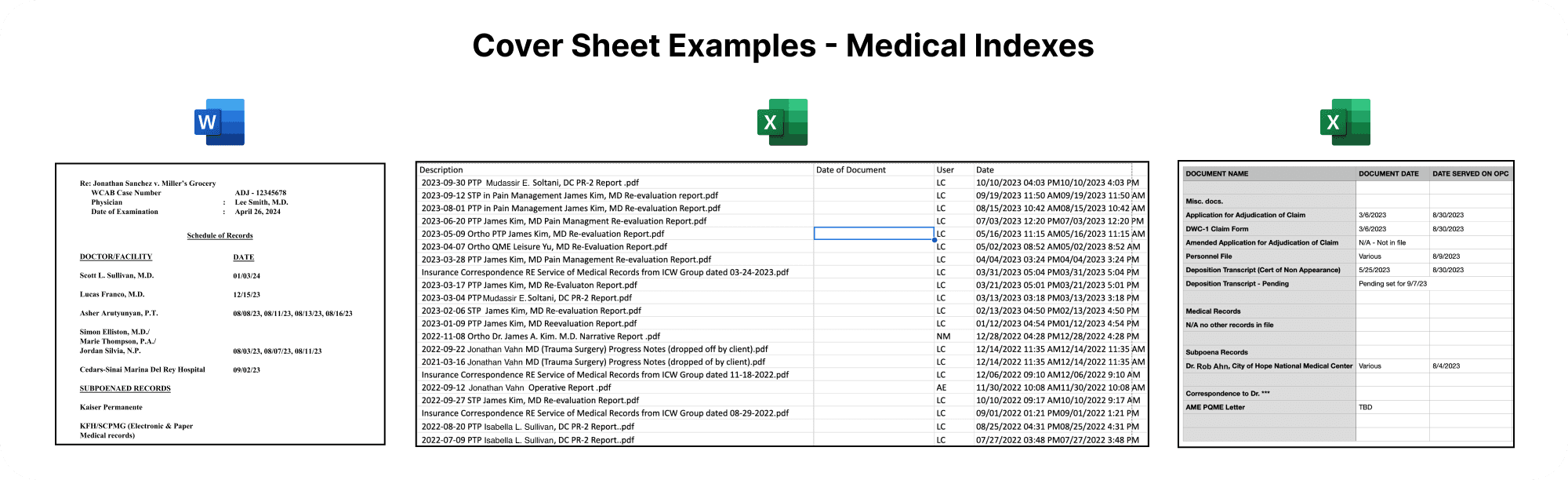
Many secretaries maintained a manual cover sheet (in Excel or Word) to track medical documents in a case.
This included information like document name, doctor or medical facility, and date.
Each update required downloading the file from MerusCase, editing it, and re-uploading it, introducing risk for user error.
They also used third-party tools like Adobe (which costs extra money) to manually reorder the medical documents to match the order on the cover sheet.
Finally, all medical documents are combined with the cover sheet into a single PDF that can be sent to government agencies, clinics, and other law firms.
Users do this daily, for many cases.
Gathering Requirements
While screen sharing, users showed us how they create medical indexes. I saw firsthand how time consuming it is.
I asked questions about what columns users always need on the index (ie. date of document, document name etc), and how they categorize documents.
Example: Some firms put all subpoenaed records in one place at the end of the PDF file, so those are grouped together at the end on the cover sheet.
Users need the ability to customize categories for their documents and reorder them.
Solution:
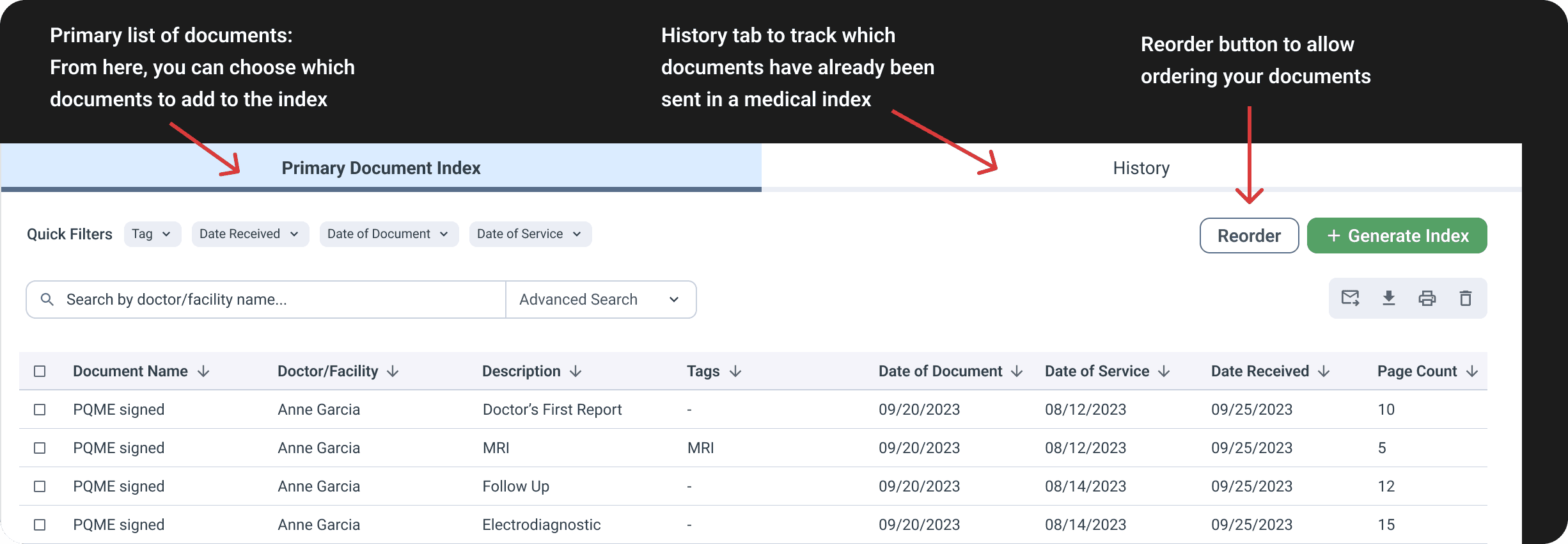
Create an in-house feature showing documents available for medical indexing in a separate area of the case (users can choose which documents to put into the index).
Allow users to reorder multiple documents at once by selecting checkboxes. If they have hundreds of documents, they can search using filters.
The system will track the order users choose for the documents, and generate a cover sheet. That way, there's no manual work to type an entire cover sheet.
Users can keep track of all medical indexes created for the case and see which documents are inside them.
From a 120-user law firm in California:
“It’s a lot of steps. Especially when we have to train our staff how to do this. If you have one hundred documents, it’s tedious.”
Solution

Goals of the survey
What actions do users want to perform on the medical index? What do they need to do with it?
What information (columns) should be visible on a medical index in MerusCase?
How should searching for documents work?
Survey Analysis (Affinity Map)
Goals of the user interviews
How do users create medical indexes currently?
What is the “life cycle” of the medical index? When is it sent? Who is it sent to?
What happens after it is sent?
Get actual medical index examples from the law firms
View User Interview Analysis
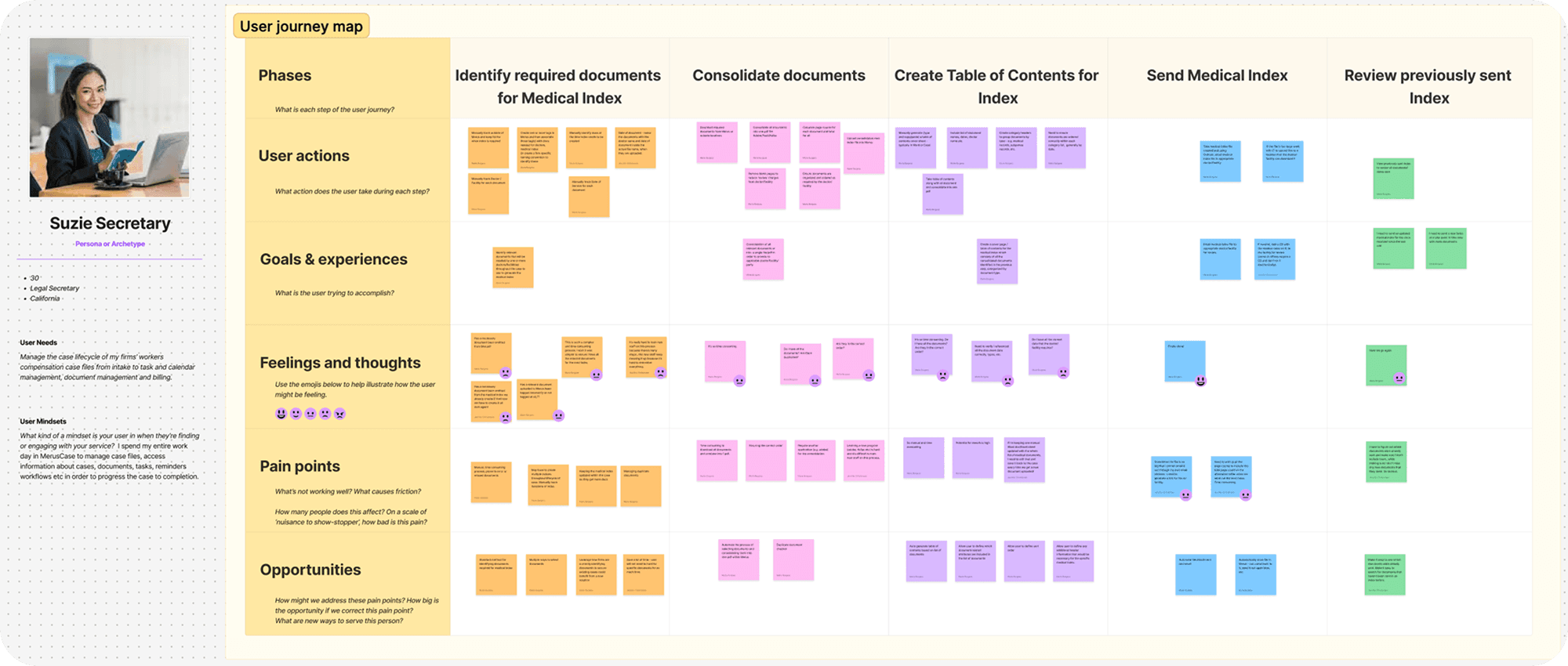
User Journey Map
After conducting user interviews, we understood the users' challenges with their current process of creating indexes.
A journey map was created with the VP of Product and the Product Manager for reference, and I began initial designs.
Suzie Secretary - User Persona
Manages the case life cycle from intake to document management, and billing.
Journey Map
Wireframes
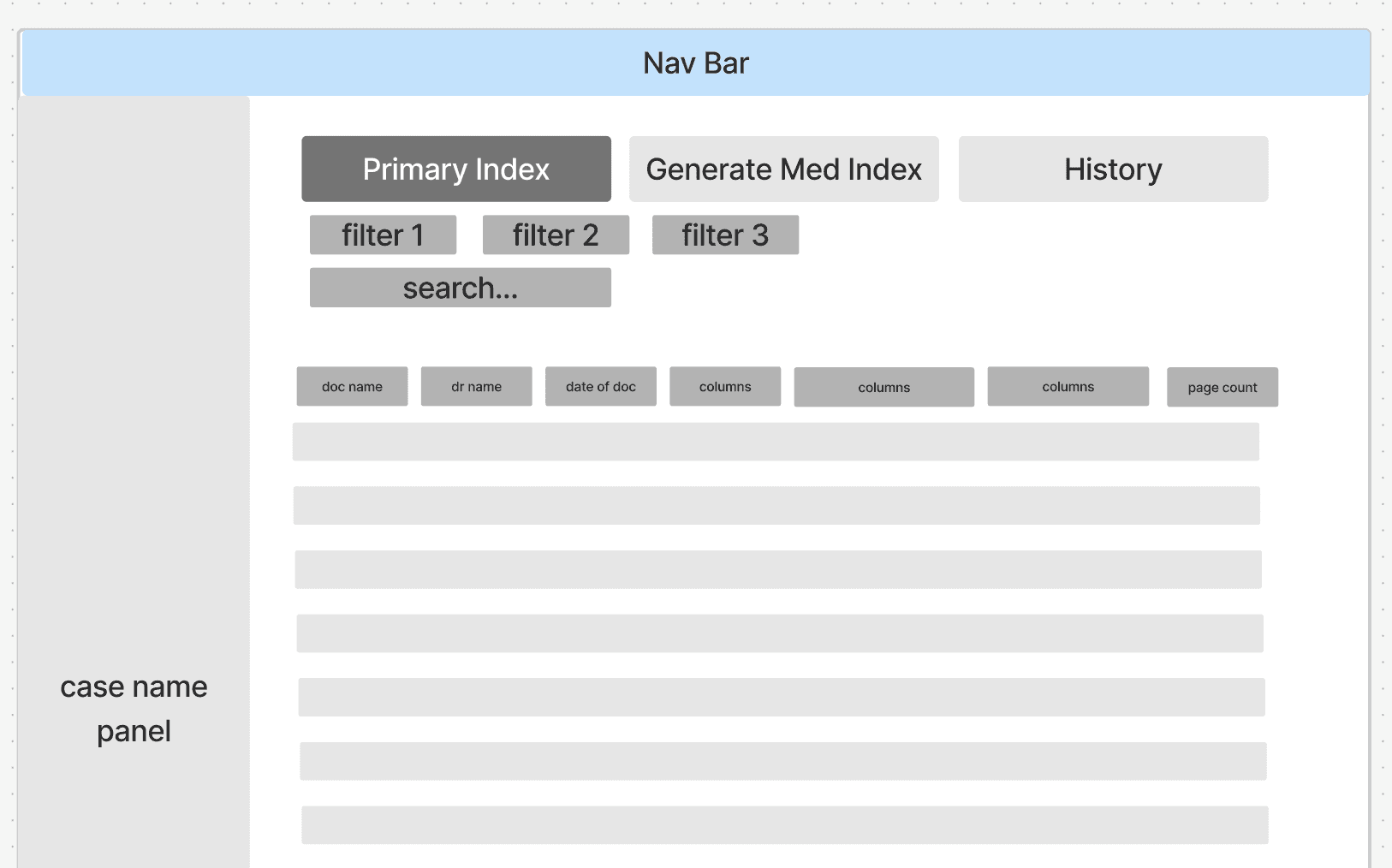
In Figjam, wireframes were created to quickly brainstorm ideas with the VP of Product and Product Manager. We discussed requirements based on information gained from the survey, user interviews, and the journey map exercise.
Users must be able to search for documents on a grid. Document name, doctor name, date of document were some important columns they may need to search by.
"History" tab - all indexes that were created for this case
"Primary Index" tab - available documents that could be placed within an index, separate from other documents
Initial Designs
First Usability Test (Maze)
Initial Usability Test
We wanted to verify that our initial ideas and assumptions were on the right track.
I chose to conduct a brief test using Maze. That way, we could get numerous quantitative data points from many users at once. We put a link on the MerusCase dashboard, leading users to the Maze prototype and test questions.
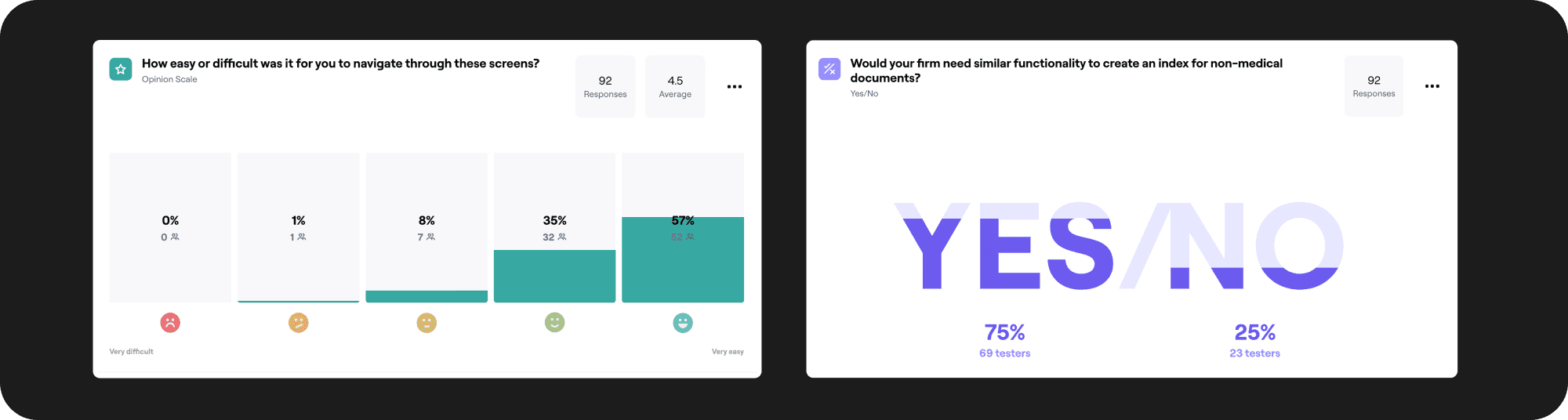
We got 92 total participants.
Test Results
On average users rated it 4.5 out of 5 (with 5 being the most easy to navigate through).
Some users wanted to utilize this feature for non-medical documents also, so we decided to re-name certain areas "Document Index" instead of "Medical Index."
Initial Usability Test Prototype
Next Design Iterations
Problem - Reordering Documents
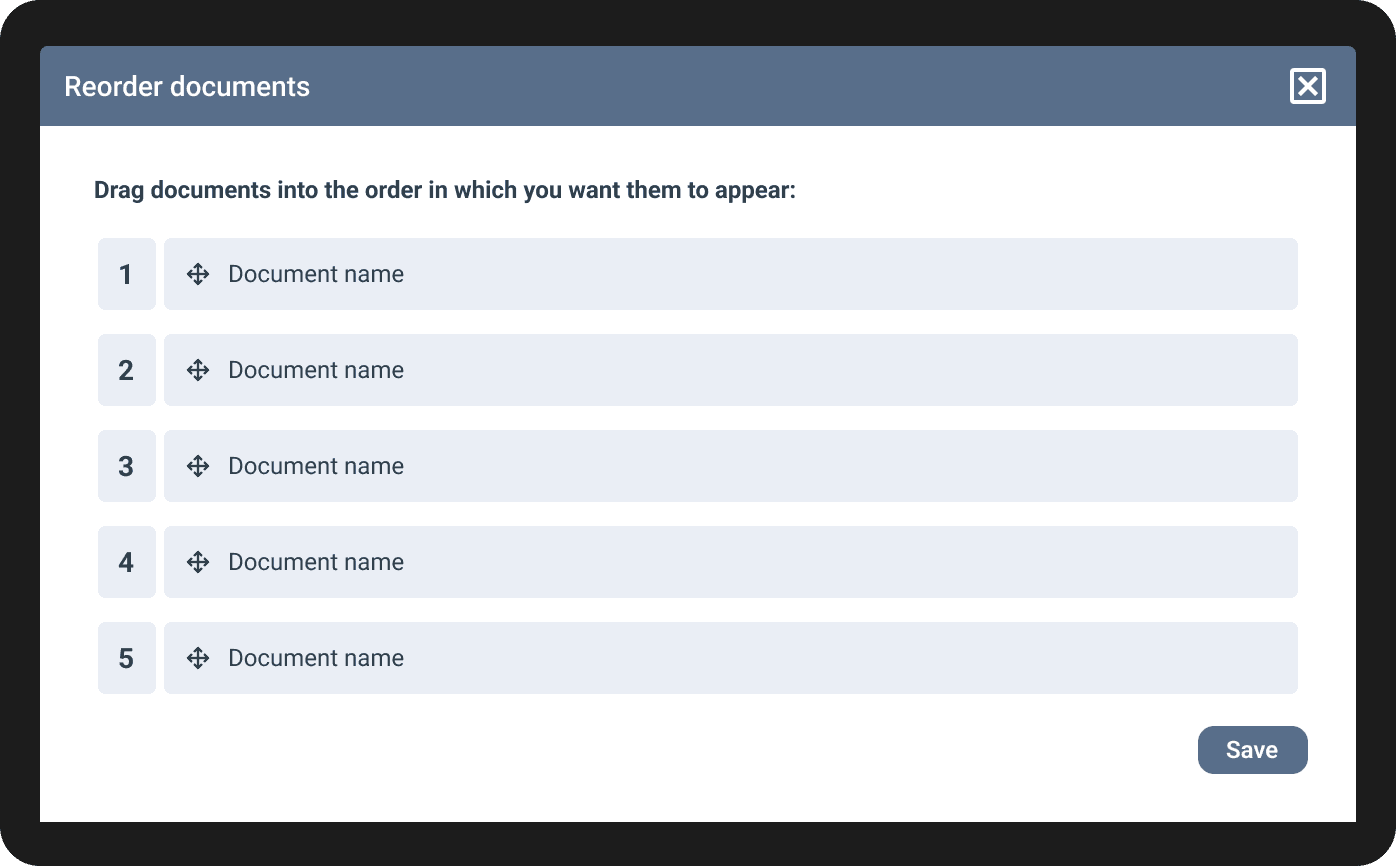
On the grid of documents, the user can click a "Reorder" button, which brings up this modal. Users can drag each document into the desired order. This way, users won't need outside software to reorder documents.
After a round of design reviews with the engineering and product teams, it was mentioned that dragging inside a modal would be difficult when scrolling through hundreds of documents on the screen.
Second Usability Test (One on One Using Zoom)
Second Usability Test
I created another usability test to verify whether or not it would be too tedious to select only one document at a time. I also wanted to verify our assumptions around categorizing documents, because I had created a few new iterations of the design since the first usability test.
The test was conducted over Zoom. I met with users one on one, recorded their screen, and gave them tasks to perform.
I chose one on one testing because I wanted to ask users various questions to get more qualitative feedback.
Test Results
As we suspected, users must be able to move more than one document into a category at a time. If there's 200 documents for example, moving them one at a time will be too tedious.
Users want the ability to edit the index after it is created.
7 out of 8 users navigated the test without any issues.
Second Usability Test Prototype
Iteration 1 - Reordering documents by dragging in the grid (before testing)
MerusCase did not have the ability to drag items inside of a grid, so I explored ideas. We decided it would be helpful to use in the future, so we created and added these components into the design system.
Here, users drag and drop documents into the desired categories. In this example the category is "Medical Records."
Problem: Users can only drag one document at once.
Iteration 2 - Reordering documents using checkboxes (after testing)
Solution: Users can select multiple documents at once by clicking checkboxes on the left of each document. Then, users click "Move to Category" and select a category from the dropdown. Numerous documents may be moved at once.
Final Designs and Solution
Added a stepper component and the ability to edit
I included an extra page/step for categorizing documents by selecting them with checkboxes, and dragging them into the correct categories. I felt the stepper was needed to mitigate a high drop off rate since another step was necessary. If users don't know how long a task will take, they might quit. The stepper included 4 steps, showed which steps are finished, and steps that are upcoming.
Users can edit the medical index by clicking "Edit" and the process takes them through each step again. We chose not to perform another round of testing, since the final designs were close enough to the previous designs that were tested.

Impact

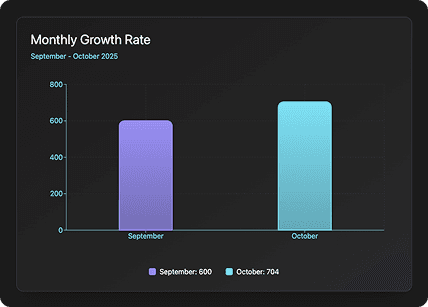
Monthly Growth Rate
The feature was released just before the end of August 2025.
The total amount of medical indexes created by users increased from 600 in September to 704 in October, demonstrating strong user engagement and feature adoption.
We saw 17.33% monthly growth rate in the number of medical indexes created (so far).
We will continue to track it for the next few months.
Drop-off Rate
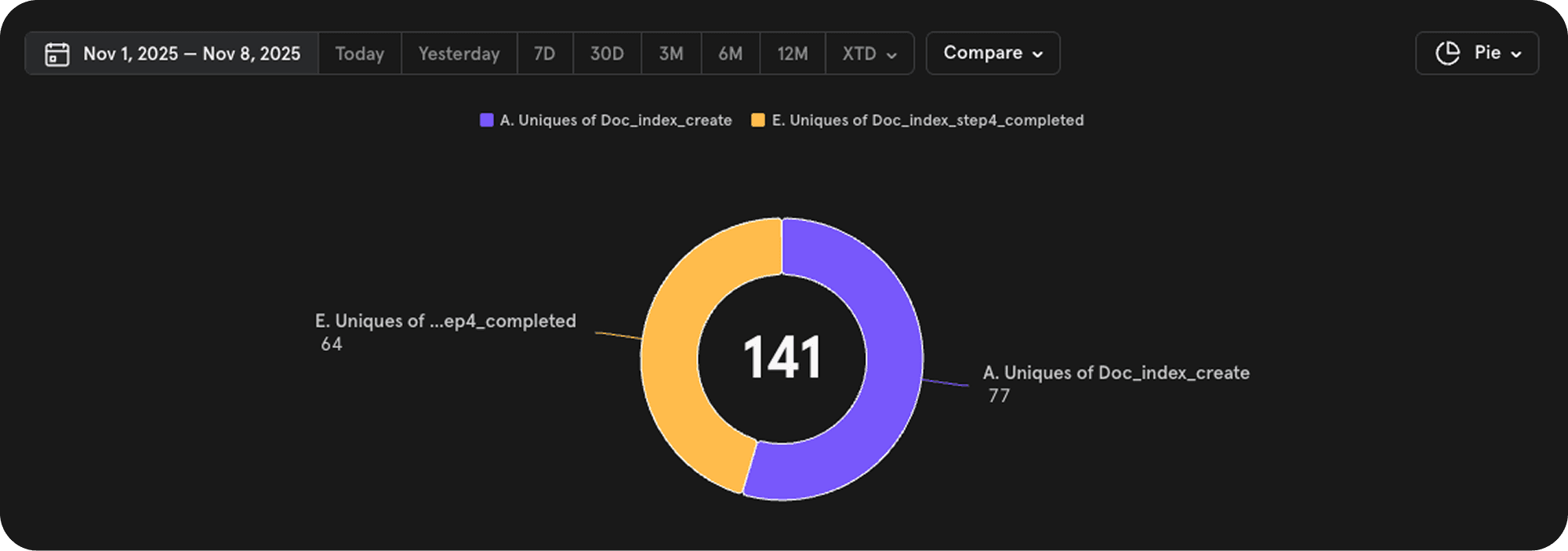
Post-release I monitored user drop-off using Mixpanel, because creating a medical index involved a four-step process. I gathered data after all initial educational webinars, since most users would understand how to use the feature by then.
Given the lack of negative feedback from users, we considered the feature a strong success in both adoption and usability.

16.88% Drop-off Rate
In a week-long period after all educational webinars were complete

77 Users
Started the process of creating a medical index

64 Users
Completed the process of creating a medical index
What I Learned
Design feedback was extremely positive. Only small feature requests to enhance functionality and customization were reported. None were critical issues or blockers for regular use.
This project underscored the importance of thorough discovery research and understanding user needs before beginning design. I don't think it would have been a success otherwise.
Post-release, our cross-functional team (engineering, product, and design) held a retrospective meeting to evaluate what worked and what did not. We decided to involve engineering earlier in the design phase to better define requirements, reveal any constraints earlier in the process, and foster collaboration.